Post ·
BaoCut: Keeping AI Video Work on an Editable Timeline
A practical look at BaoCut’s transcription, bilingual subtitles, dubbing, talking-head editing, code-driven motion graphics, and Intel Mac preview.
Finishing the first version of a video often reveals the real work: terminology needs fixing, a translation sounds awkward, one sentence needs a new voice-over, and a long pause interrupts the presentation. Being able to keep editing matters as much as the speed of the first result.
BaoCut organizes AI video work around an editable project. Transcripts, subtitles, translations, voice-overs, and visual changes enter a shared timeline, where people can adjust them before exporting. Natural-language instructions become part of an editing workflow that the user can take over at any point.
This article describes capabilities documented in the repository and release notes available on October 20, 2026. A documented feature is not evidence of successful testing on every platform. gptbert/baocut is a fork of JimLiu/baocut. We first cover the shared product capabilities, then the Intel Mac preview distributed by this fork.
System architecture: one Runtime and one video write path
The diagram summarizes the main call relationships in the repository’s architecture document. Clients use the Runtime’s public interfaces. Inside the Runtime, Agent Harness, Video, and Models handle agent tasks, video services, and model capabilities respectively. Video changes pass through the Video service to Rust Engine Host. VideoEngine / VideoStore own video state; WASM preview in the UI has no write authority.
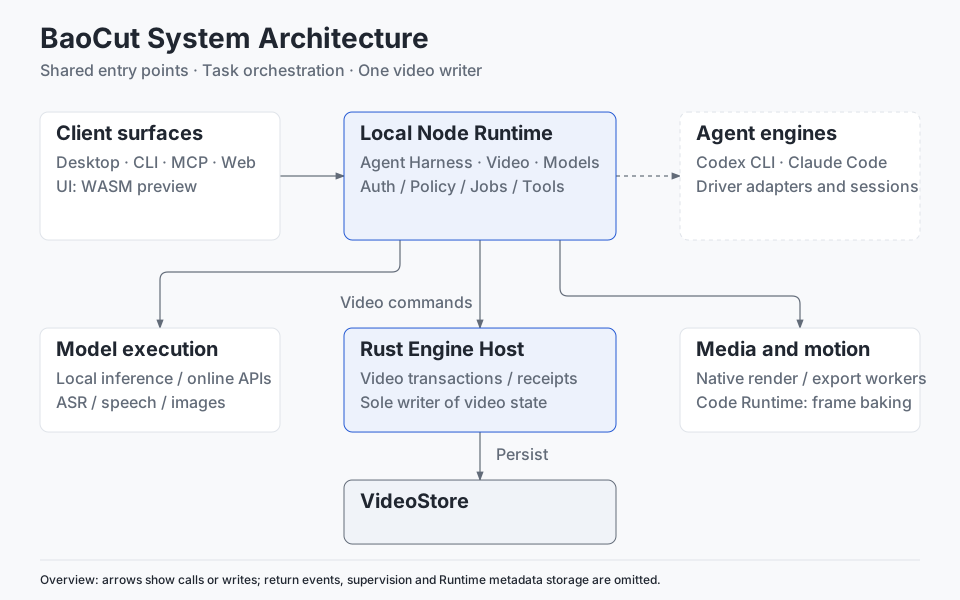
Click the diagram for a larger view. Solid arrows indicate calls or writes; the dashed arrow connects external agent engines. Return events, supervision processes, and Runtime metadata storage are omitted. Local model backends vary by platform; Intel limits are discussed below.
This separates AI task orchestration from precise video-editing semantics. Outputs from model and media jobs must still be applied through the video service and engine, rather than letting a model write directly to the video database. Architecture reference (§1–2).
Start with footage you already have
An interview, lesson, or talking-head recording is a straightforward starting point. BaoCut can use local speech-recognition models or online APIs to produce timed text. Documented local options include Whisper, Qwen3-ASR, and MOSS with speaker diarization. Segments can appear on the timeline as the job progresses, allowing review before the entire recording is processed.
Timed text gives later work a common reference: which sentence a subtitle belongs to, where a point was made, and where a short clip should begin. Accuracy still depends on the model and recording. Technical terms, overlapping speakers, and noisy passages need human review.
Connect subtitles, translation, and dubbing
BaoCut supports original-language, translated, and bilingual subtitles, with subtitle styles remembered per project. The agent translates sentence by sentence, and individual lines remain available for correction.
Cross-language dubbing connects translation, vocal/background separation, sentence-level speech synthesis, and placement of the new audio track. The documentation names HTDemucs for separation and supports preset or cloned voices. Obtain permission before using someone else’s voice, and listen to the final result for pronunciation, expression, and transitions.
For example, preparing an English-subtitled version of a Chinese lesson could begin with terminology corrections in the transcript, continue with translation and subtitle breaks, and optionally add English narration. This is an illustrative workflow assembled from documented capabilities, not a test completed for this article.
Use text to help edit a talking-head recording
The agent can work on filler words, long pauses, retakes, and false starts on the timeline while preserving the original media. The user then reviews whether the cuts sound natural and preserve the intended meaning, making further manual adjustments where needed.
The same timed transcript can support chapters, summaries, titles, blog drafts, and short-video selections. Timestamps make it easier to return to the source. They do not replace fact-checking or guarantee that a summary includes everything important.
Start with an idea
Existing footage is only one entry point. BaoCut documents 24 built-in scene templates with example prompts, covering explainers, product launches, tutorials, data stories, and animated typography.
One useful production approach starts with the script and narration, then arranges the visuals around the generated speech. Actual speaking time can guide the pace of the shots. Local image models or online services can supply still images when needed.
Motion graphics also have a code-based entry point. The agent writes a self-contained HTML composition, imports it as a code bundle, bakes frames, and places the result on the timeline. BaoCut supports the baocut/1 and hyperframes/1 contracts for elements such as lower thirds, large numbers, callouts, and brand intros. Generated compositions still need previewing to check fonts, wrapping, duration, and frame boundaries.
People and agents work on the same project
A central design choice is to route human and agent edits through shared commands, transactions, and undo mechanisms. Dragging a clip and asking the agent to revise a caption both affect the same video project.
That gives a request such as “change this sentence” a specific editing target. Revisions can be local during editing; final export still requires rendering, and processing time depends on the footage, effects, models, and hardware. The project also emphasizes explicit agent scope, permissions, budgets, and change receipts. Users should still inspect what changed and what remains unchecked.
Four entry points share one Runtime
| Entry point | Typical use |
|---|---|
| Desktop app | Talk to the agent, preview the timeline, adjust subtitles, and continue editing |
| CLI | Connect project operations to scripts and consume structured results |
| MCP and the BaoCut skill | Let an external agent use the shared tool catalog |
| Web client | Open a video editor in a browser using a one-time link generated by the Runtime |
This interface design is useful for people who already have an agent environment. BaoCut supplies the video project and tools; the external agent interprets the task and chooses operations. The entry points share a Runtime, while compatibility and validation coverage vary by agent engine and should be checked in the current documentation.
Local models offer choices with practical conditions
Capabilities such as transcription, speech synthesis, and image generation can use local models or online providers. Downloads default to Hugging Face, with ModelScope and custom mirrors as alternatives. The documentation notes that a few files missing from ModelScope still come from Hugging Face, so changing the download source does not make the setup fully offline.
Local inference also does not mean the entire task stays on the machine. External agents or online models may receive relevant text or media, depending on configuration. Service costs, model storage, and hardware performance belong in the workflow decision too.
Packaged applications contain the Runtime and native workers. Media analysis, transcription preparation, and export additionally require external ffmpeg and ffprobe tools. Agent features require an installed, signed-in supported agent engine. Node.js and Rust are development requirements rather than prerequisites for using the packaged app.
Intel Mac users should read the separate release notes
The upstream README’s regular macOS downloads target Apple Silicon on macOS 14 or later. Windows has CPU, CUDA, and Vulkan variants. Linux is documented as a source-development path, which does not imply that a Linux installer is available.
This fork separately publishes an Intel Mac 3.8.0 preview, with ZIP, DMG, and checksum files. Its notes record signing, notarization, installation, and Runtime/worker checks, alongside explicit limits:
- It targets native x86_64 machines running macOS 14 or later and has no automatic update feed.
- MLX/Core ML are disabled on Intel; Whisper uses whisper.cpp Metal where supported.
- LiteRT-dependent semantic search is unavailable on Intel. The upstream capability catalog is not an Intel compatibility checklist.
- Real-model inference and complete editing/export workflows were not verified for this release.
The preview offers Intel users a way to try BaoCut. Successful packaging and notarization should not be read as proof that every AI workflow has been tested. Read the complete notes for the version you download.
Export the result and keep a path to the next revision
BaoCut supports MP4, SRT/WebVTT, transcript and audio exports, plus a portable .baocut project bundle. The bundle includes a video snapshot and document and asset versions, allowing editing to continue on another machine. It does not include the original video’s complete transaction or undo history.
This reflects the product’s direction: the finished video is a deliverable, while the editable project preserves room for another revision. That room is valuable for lessons, interviews, multilingual content, and videos that need regular updates.
Source availability also needs to be distinguished from licensing scope. The project currently uses BaoCut Community License 1.0. Making and selling video content has different conditions from selling or rebranding the software or offering a hosted service. Third-party models and assets retain their own licenses; consult the repository files for the applicable terms.
A useful first trial is a short talking-head recording: transcribe it, correct the text, add subtitles, preview, and export once before introducing translation or dubbing. A small project that can be revised repeatedly makes it easier to judge whether this workflow fits your needs.
Comments
Join the discussion with your GitHub account. Open on GitHub