Post ·
Building taobook: It Started with a Book
A look at taobook's journey from an iOS reader to Android and native HarmonyOS apps, and the engineering behind reading, translation, and text-to-speech.
Ebooks come in many formats, but reading is often interrupted by differences in formats, devices, and app capabilities. One document is an EPUB, another is a PDF; when I want to listen, the narration can lose its place relative to the text on screen. I started building taobook to bring importing, reading, searching, translation, and text-to-speech into one smooth experience.
taobook is a reading app for personal use. It starts with local books: users choose their own files, and the app organizes them into a library, saves their reading position, and provides a table of contents, search, bookmarks, annotations, or narration as appropriate for the content. For online capabilities, users can add book sources or configure their own model services for translation and conversation. Reading itself does not require an account or a model API key.
The System at a Glance
Each of the three clients implements its own import, reading, and local storage features. iOS and Android also offer online book sources and optional model capabilities; the native HarmonyOS app currently focuses on local reading and system text-to-speech. There is no data synchronization between the three apps yet.
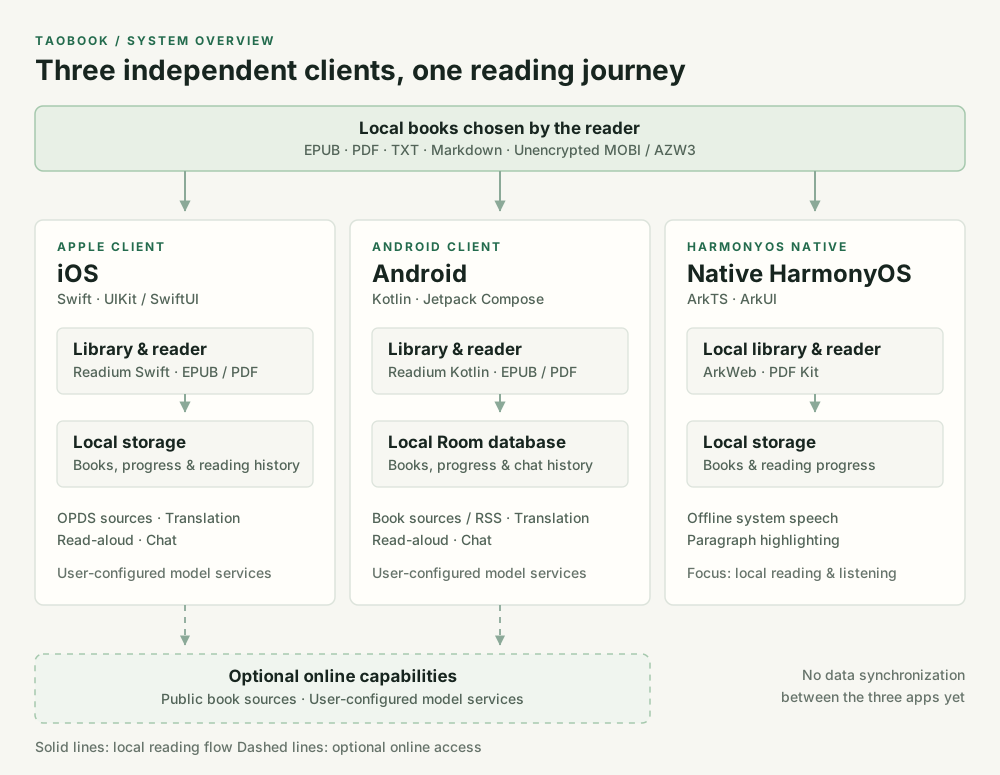
Click the diagram to view it at full size.
First Stop: Building a Complete Reading Experience on iPhone
The project began on iOS, with a reading engine based on Readium Swift Toolkit. I first tackled the foundations of an ebook app—the parts that are easy to underestimate: importing different formats, rendering EPUB and PDF files, managing the library, tracking reading progress, and providing reading settings. TXT and Markdown files can be converted into content the reader can handle, while OPDS book sources expand the ways to discover and open books.
Over time, taobook grew from an app for opening a book into an app for understanding and working with one. While reading, users can translate content through system services or model services they configure themselves. Text-to-speech offers a choice of system voices and model-generated voices, and translations can be saved for later reading. One principle has guided this work throughout: model capabilities should support reading, not be a prerequisite for it.
The details often take the most time. For example, the narration toolbar needs to appear when the reader taps and disappear when they tap again; changes in playback state must not override that choice. MOBI and AZW3 files are another example: they cannot be passed directly to an EPUB reading engine. Unencrypted files need to be converted on the device first, and the resulting EPUB chapters and XHTML must parse reliably. During one investigation on a physical device, I found that a “successful” conversion did not mean the whole book was readable. I had to turn to later chapters and keep checking.
Second Stop: Rebuilding for Android
For Android, the goal was to preserve taobook’s product structure while using a technology stack suited to the platform. The app uses Kotlin, Jetpack Compose, and Readium Kotlin Toolkit. Books and chat history are stored in a local database, with reading preferences persisted separately. Imports go through the system file picker, so users explicitly choose their files without the app requesting access to all device storage just to read a book.
The Android app gradually gained a library, EPUB and PDF reading, bookmarks and highlights, a reading assistant, book source management, RSS/Atom article reading, model settings, and text chat. Reading an article involves more than opening a web page: it also means handling body text extraction, a table of contents, search, reading progress, interrupted narration, and network failures. Chat likewise involves more than displaying an answer; it needs streaming output, a way to stop generation, conversation history, and retries.
This work made one thing clearer to me: consistency across platforms does not require identical code on every platform. Readers need familiar ways to get things done and results they can rely on. File systems, reading engines, speech services, and UI lifecycles, however, need implementations that fit each platform.
Third Stop: A Native Reader for HarmonyOS
The native HarmonyOS app is not a repackaged Android APK. It uses ArkTS, ArkUI, and ArkWeb for the library and EPUB reading, and integrates the system’s offline speech service for narration by text segment, continuation across chapters, and text highlighting. EPUB, PDF, TXT, Markdown, and unencrypted MOBI/AZW3 files each have their own import and display handling.
I deliberately kept this version’s initial scope focused: make local book imports, reading progress, and listening work well before pursuing feature parity with the other platforms. Issues such as blank chapters, inaccurate table-of-contents titles, and unexpected jumps to the next text segment after stopping narration all required observation and fixes on a physical device. It was a reminder that a successful build is only a starting point. The actual reading experience takes place with a particular book on a particular device.
What Comes Next
taobook now has iOS, Android, and HarmonyOS apps, but they remain independent applications. Their features differ, and they do not synchronize across devices. Encrypted books and text recognition for scanned PDFs are also subject to clear limitations.
I will keep refining taobook around the original goal: make my own books easier to import, smoother to read, and more natural to listen to. I will add translation and conversation where they are useful, while continuing to improve file handling, reading progress, and privacy choices. For a reading app, the best new feature is one that makes people want to return to their books.
Comments
Join the discussion with your GitHub account. Open on GitHub